Three things travel together in the mobile apps: the regrab counter, NoomiCoins and skins. The official Google Play and App Store listings describe all three, and describe an optional account sign-in under Settings → Account that is said to carry them between devices. This page explains what is documented, what is not, and the small number of rules that keep this part of the game boring.
What the listings describe
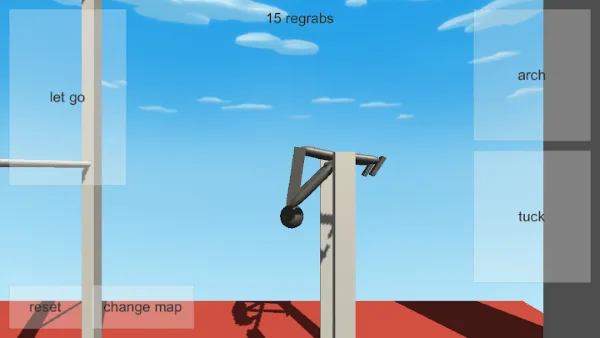
The store text presents NoomiCoins and skins as progression items, tied to the same account system that preserves your regrab total. The regrab counter itself is visible in the interface: the mobile screenshots show an N regrabs readout at the top of the screen, and the developer's browser listing screenshot in this guide shows the same idea running well past a hundred regrabs.
That counter is the plainest progress signal the game offers. It needs no purchase, no menu and no explanation. If you play a session and the number goes up, the session worked.
Reading the regrab counter
Treat the counter as a log, not as a score with a leaderboard behind it. The listings do not describe a ranking, a daily reset, a decay rule or a reward threshold, so there is no documented reason to protect it at the cost of actually playing.
- Record it at the start of a session, not the end. A number you wrote down before you started is evidence; one you remember afterwards is a feeling.
- Attribute the gain. Note which map and which swing produced the regrabs. The regrab guide explains how to find the one change that made the difference.
- Reset the experiment, keep the total. The reset control is there to end a bad run. Use it freely; the number stays where it is.
What NoomiCoins are described as
NoomiCoins are named in the listings as part of the progression the account backup preserves. That is as far as the published text goes. No price is stated, no bundle is described, no earning rate is published, and no unlock cost is listed anywhere we can cite.
So treat any number you see as coming from your own build rather than from this guide. If your version shows a price that looks wrong to you, the store checkout page is the authority, not a fan page and not a screenshot somebody sent you.
One practical consequence: you cannot budget from this page. Decide what you actually want from the currency before you open the store, and stop there.
What skins are described as
Skins appear in the same store text as NoomiCoins and in the same account-backup promise. The listing does not spell out, in the text we checked, what an individual skin changes, and nobody has documented a full skin list. Some may be purely cosmetic, some may not be; the honest position is that you will only find out by owning it.
That makes skins a poor thing to buy speculatively. It also makes them a good thing to protect, because they are named as one of the three things the account carries.
Buying safely
This part is short because the rules are short.
- Buy only inside the official store app. The official builds are the ones linked from Google Play and the App Store. Purchases there are the only ones the account system describes.
- Never buy coins from a third-party seller site. There is no documented support for coins bought outside the store, and no guarantee the account even recognises them.
- Do not install modded or unofficial builds. They are not the app the listings describe, they cannot use the account backup, and they put your progress outside anything the developer controls.
- Keep the purchase receipt. If a charge looks wrong, the store's own purchase record is the thing support will ask for.
If someone offers you coins cheaper than the official store, the correct answer is no, without a discussion. There is no documented discount path and no documented third-party seller channel.
The screenshot at the top of this page is the developer's own browser listing, and it is worth reading carefully for a reason that has nothing to do with branding: it shows the regrab counter sitting next to the arch and tuck zones, at a total well past a hundred. That is the progress model in one image. A number that grew because somebody caught bars repeatedly, with no menu, no purchase and no prompt involved.
What the backup does not cover
The account sign-in is described as keeping regrabs, NoomiCoins and skins across devices. That is the whole promise as published. The listings do not say that replay clips move with the account, do not say that settings move with the account, and do not say anything about your progress surviving an uninstall without a sign-in.
So the three items above are worth protecting carefully, and everything else you own you should copy out yourself. The progress backup guide has the pre-switch checklist, and the replay guide covers getting clips off the device rather than trusting them to travel.
How the three interact
The listings group the counter, the coins and the skins into one progression picture, and the account is the thing that holds the group together. That gives you a practical order of concern.
- The counter is yours to grow. It moves when you catch bars, and it needs nothing but play.
- The skins and coins are things you hold. They are protected by the account, so securing the account comes before spending anything.
- The account is the fragile piece. It is optional, it is easy to skip, and it is the only thing keeping the other two alive through a device change.
Read that as an order of operations rather than a warning. Turn the backup on first, confirm it works by playing a few swings, and only then decide what to spend. Doing it the other way round leaves you buying something you cannot carry to a new phone.
When the counter is not moving
A flat counter across a session is information, not a failure. Four causes cover almost every case, and you can separate them in one session.
- Your swing is not reaching the bar. The counter only rises when a catch happens. If your release path is short every time, nothing downstream matters. Go to the regrab guide.
- You are resetting before the catch resolves. Anxiety resets feel efficient and quietly delete the attempts that would have landed.
- You changed two things at once. A faster swing and an earlier release cannot be told apart. Go back to one.
- You are on the browser build, or on a build where the counter is not shown. The counter is visible in the developer's browser listing screenshot and in the mobile screenshots, but if you cannot see a counter anywhere, confirm which build you have with the edition comparison.
What to do with coins today
Spend them on something you have already decided you want, not on something a counter suggests you might want later. The regrab count will still be there tomorrow, and it grows for free, which is the best deal the game offers.
When you want the wider picture, read the maps guide for what the currency is spent around, the edition comparison to confirm you are on the build that has any of this, and the guides index for the rest.
Frequently asked questions
What are NoomiCoins in NoomiClone?
A currency described in the official Google Play and App Store listings, used alongside skins and unlocks. The guide separates what the listings actually describe from what the game does not promise, so you know which claims are sourced.
What does the NoomiClone regrab counter do?
It tracks consecutive bar catches. It is a measure of a chain rather than of a single attempt, so the guide covers how to read it and what a number there does not tell you about the quality of a catch.
Are NoomiClone skins purchasable?
They are described as part of the store listing alongside NoomiCoins and unlocks. The guide has a section on buying safely that sticks to what the listings say rather than guessing at price points or availability.
Why is my NoomiClone counter not moving?
The counter tracks consecutive catches, so it resets when a chain breaks. The guide covers when the counter is not moving and what to check, including the interaction between the counter, the coins and the skins.
Sources and scope. Browser key bindings and mobile feature descriptions were checked against the developer's browser listing, Google Play and App Store on October 19, 2026. Practice drills are independent editorial suggestions. Game screenshot provenance is documented in About & sources.