NoomiClone exists in more than one shape. There is the classic browser build, which runs inside a page and is driven by four keyboard keys. There are also the current Android and iOS apps, which are described by the official store listings. The two are close enough that a tutorial written for one can leave you completely stuck on the other, and the wrong tutorial usually fails quietly: no error, just a trick that never lands.
This page is the bridge. It names what each build documents, marks every mobile-only feature as a store-listing feature, and gives you a five-second test for telling the two apart before you spend an evening on the wrong advice.
Identify your build in five seconds
Look at the controls you are touching, not at the icon on your home screen.
- Four keys and no buttons. If the game runs in a browser tab and responds to ← for arch, Space for tuck, ↑ for let go and R for reset, you are on the browser build. Those are the only inputs the developer's browser listing documents.
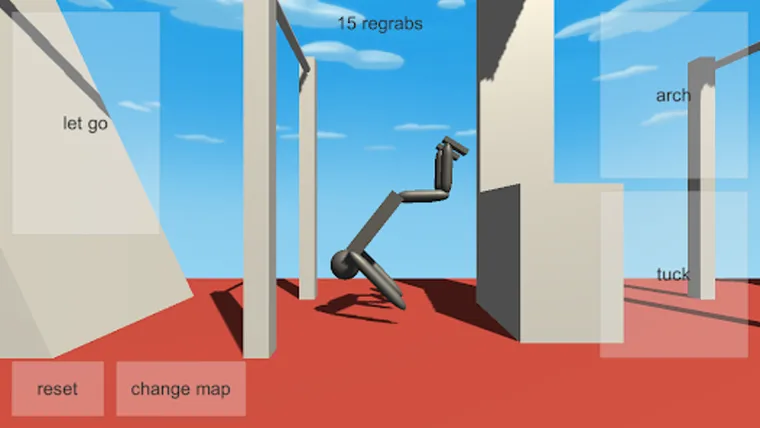
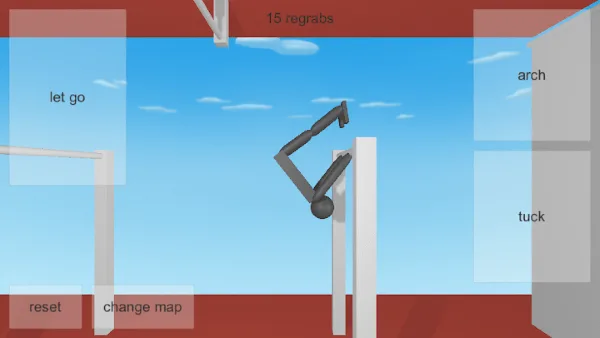
- Labelled touch zones. If you can see on-screen labels for let go, arch, tuck, reset and change map, plus a counter near the top of the screen reading a number of regrabs, you are on a mobile app build.
- A map-change button. A visible change-map control appears in the mobile screenshots. The browser listing documents no map-change key at all.
If the answer feels half right, close the tab and check what you actually launched. Mixed signals usually mean a browser tab from an old link is sitting behind an app icon, and your fingers are being trained by the wrong version.
Feature-by-feature comparison
Everything in the right-hand column comes from the official Google Play and App Store listings. Nothing in that column is documented for the browser build, and nothing in the left-hand column depends on your store version being current.
| Feature | Browser build | Mobile apps |
|---|---|---|
| Controls | Four documented keys: Left Arrow arch, Space tuck, Up Arrow let go, R reset | Touch controls, with configurable buttons listed on Google Play |
| Map count | The browser listing does not state a map count | 12 bar maps and 6 tumbling maps |
| Switching maps | No map-change key is documented | A labelled change map touch zone in the mobile screenshots |
| Reggrab counter | Shown in the developer's browser listing screenshot | An N regrabs counter at the top of the mobile screen |
| Twists and layouts | No twist input is documented for the browser build | Twists and layouts are listed among the mobile moves |
| Replay video export | Not documented for the browser listing | Described on both stores; clips save to Photos on iOS and to a NoomiClone album on Android |
| Replay options | Not documented | Show Buttons and Show Taps replay settings on Google Play; higher-quality exports can use HQ credits |
| Account backup | Not documented | Optional sign-in under Settings → Account, described as keeping regrabs, NoomiCoins and skins across devices |
| Skins and NoomiCoins | Not documented | Described in the store listings alongside the regrab counter |
| Languages | Not stated | 17 languages described in the listings |
| Frame rate | No frame-rate option is documented | A high-frame-rate option is described in the listings |
What the browser build actually documents
Four inputs, and that is the whole list. ← arches the body, Space tucks it, ↑ lets go, and R resets the attempt. Each one is described on the developer's own listing, which is why our controls guide and our first swing drill are written with nothing else in mind.
What the listing does not document matters just as much. There is no separate grab key, so a catch happens because of where you released, not because you pressed something. There is no documented twist input, no documented layout input, and no documented map-change key. The listing also does not state how many maps the browser build contains, so any number you read about map counts belongs to the store listings, not to this build.
Our technique guides respect that limit on purpose. The swing timing drill, the release timing work and the regrab diagnosis all assume you have four keys, because a technique page that quietly assumes a fifth key is useless to you.
Playing both builds without confusing yourself
Nothing stops you running the apps and the browser build side by side, and plenty of players do. The only real cost is mixing up their vocabularies, so give them separate sessions and separate mental labels: the browser build is where you practise timing drills, the apps are where you practise moves.
Keep the browser build open in a tab rather than in a half-played install. It needs no update, no store and no storage space, which makes it the cheapest place to run the first session guide and the common mistakes drill as many times as you like.
What the store listings add
The official Google Play and App Store listings describe a larger game. Touch controls with configurable buttons on Android, 12 bar maps and 6 tumbling maps, twists and layouts among the move list, replay video export with on-screen playback options, and an optional account sign-in under Settings → Account that is described as carrying regrabs, NoomiCoins and skins between devices. The listings also describe 17 languages and a high-frame-rate option.
Two of those deserve care. The account backup is described as optional, so an install that never signs in is still a working install; you simply have nothing travelling with you. And the higher-quality replay export is described as able to consume HQ credits, which makes replay quality a choice you pay for rather than a free default.
Every one of those claims comes from the store text, which is written for a specific app version. Menus move, labels change, and a feature listed today may be absent from an older install. Read the listing, then confirm in your own build.
Which guide to follow from here
Use the table below to pick the next page instead of guessing. If a drill tells you to press something you do not have on screen, you are on the wrong column.
| Your situation | Start here |
|---|---|
| Browser build, keys not doing what you expect | Controls, then PC setup |
| Browser build, swing still inconsistent | Swing timing and release timing |
| Browser build, misses a lot | Regrabs and falling recovery |
| Mobile, want to know what to play | Maps and modes |
| Mobile, want to see your own attempts | Replay export |
| Mobile, about to change phone | Progress backup |
| Not sure which build you have | Stay on this page and run the five-second test again |
When this page is out of date
Versions move faster than fan guides do. Treat this page as a map of the shape of each build, not as a changelog.
- Check the version your store shows for the installed app.
- Open the app's settings and look for Account, the replay options and any frame-rate toggle.
- If those are present, this page's description of your build is broadly right even if the wording differs.
- If they are missing, your install predates them, and the store listing may be describing a newer release than the one you are running.
The updates guide shows how to verify all of that on your own device, and the maps guide explains the bar and tumbling mode split in detail. If something here does not match your screen, the screen wins.
Frequently asked questions
What is the difference between the NoomiClone browser and mobile versions?
They are separate editions, not one game with two skins. The browser build is the classic HTML5 Unity version with four documented keys. The mobile apps add features such as twist input, replay recording, slow motion and more maps, with touch controls instead of the keyboard.
How do I know which NoomiClone version I am playing?
Five seconds. The browser build runs in a page and uses arrow keys, Space and R. The mobile apps use an on-screen touch layout and show store features such as maps, coins and skins. The guide has a quick identification table and a feature-by-feature comparison.
Which NoomiClone guide should I follow?
Follow the one labelled for your edition. Every guide on this site states whether it covers the browser build, the mobile apps, or both, so you can tell before you read a paragraph that does not apply to you.
How do I know when this page is out of date?
The guide tells you exactly which features come from the store listings and when they were checked, so you can see whether the information is still current. It also tells you where to check the truth on your own device.
Sources and scope. Browser key bindings and mobile feature descriptions were checked against the developer's browser listing, Google Play and App Store on October 19, 2026. Practice drills are independent editorial suggestions. Game screenshot provenance is documented in About & sources.