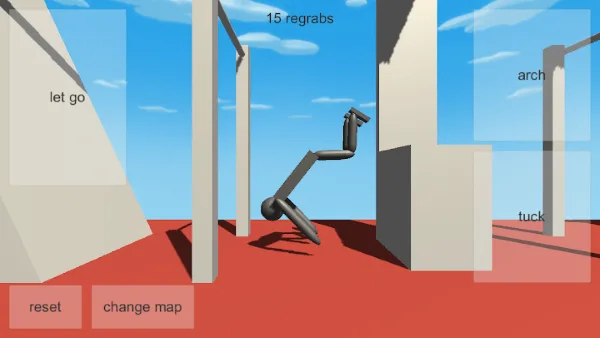
The official Google Play and App Store listings describe NoomiClone as two families of level rather than one long course: 12 bar maps and 6 tumbling maps. If you have read a guide that mixes those two families together, or that counts levels the store never mentions, you can lose an evening chasing a map that is not in your build.
This page stays inside what the listings actually say, then adds a practical way to choose where you practise. It also explains why the same advice behaves differently in the classic browser build.
What the listings count, and what they name
Two numbers, both from the store text: 12 bar maps and 6 tumbling maps. The listings also name four bar maps as examples: Classic, Trampoline, City and Workout Park. Those four names are the complete list of maps this guide is willing to use.
That leaves two thirds of the bar maps unnamed here on purpose. Nobody has documented the other eight names, and inventing them would make this page read confidently while sending you looking for a level that does not exist. Open the change-map control in your own build and the remaining names will be sitting in front of you.
Bar maps
A bar map is built around hanging, swinging and catching. That is the mode the game is named for, and it is the mode almost every timing problem lives in. On a bar map, the distance between two bars is the thing you are actually managing: too close and the swing never loads, too far and the release is asking for a catch you cannot reach.
Because bar maps reward a repeatable swing rather than a dramatic one, they are the right place to build fundamentals. The swing timing drill assumes exactly this environment: one bar, one release, repeated until the motion stops surprising you.
The four maps named in the listings differ in what they ask of you. Classic is the sensible first stop, because a baseline map is the only place where a mistake tells you something about your input rather than about the scenery. Trampoline and Workout Park are the ones worth trying when you want a release that costs you nothing if it fails. City is the one to move to when your basics hold and you want bar spacing to be the problem instead of your timing. That last sentence is editorial judgement, not a listing claim; treat it as a starting order, not a difficulty ranking.
Tumbling maps
The 6 tumbling maps are described in the listings as level pieces built from boxes, ramps, platforms and moving blocks. Read that description carefully, because every word in it changes how you play. There is no bar to hang from, so the four-input vocabulary still matters, but the shape of a good attempt is completely different: the problem is route and momentum, not release window.
Moving blocks are the detail that surprises most new players. They mean a route that worked last session may not work this session, because the floor changed underneath it. The habit that saves you here is the same habit that saves you on a bar map: reduce the attempt until it becomes boring, practise it, then add one element back.
If you arrive at a tumbling map from a bar drill, expect your release timing instinct to be wrong at first. You trained yourself to hold a position and fire at a moment; a tumbling map wants you to read the ground ahead and carry speed through it. Start with the first session guide and reset with R between attempts instead of chasing a run.
The change-map control
On mobile, the store screenshots show a labelled touch zone for change map alongside let go, arch, tuck and reset. That label is your proof that you are running the app build described in the listings, and it is the control you use to move between the 12 and the 6.
The browser build has no equivalent that the developer documents. There is no map-change key in the four-input list, and the browser listing does not state a map count. If you are reading this on a keyboard and hunting for a map key that does not exist, that is not a bug on your machine. Read the edition comparison and decide which build you want to learn on.
Picking a map to learn on
Do not open a new map because you are bored. Open one because a specific habit needs somewhere to live. The table below is a starting plan, built from what the listings describe rather than from a ranking.
Change maps slowly, and only at the start of a session. Switching mid-session feels productive because every attempt looks new, but you lose the comparison that makes practice work: the same swing on the same map, run again. The one exception is recovery. If a map is costing you attempts with nothing to show, leaving is cheaper than staying.
| Goal | Mode to use | Why |
|---|---|---|
| Make your swing repeatable | A bar map, starting with Classic | Hanging and swinging is the core loop; a bar map is the environment the listings describe most directly |
| Test a release you are not sure about | Trampoline or Workout Park | Named in the listings as bar maps; try them as low-consequence places to spend an attempt |
| Handle bar spacing you find hard | City | Named in the listings; a different layout makes spacing the variable |
| Learn to route without a bar | A tumbling map | Boxes, ramps, platforms and moving blocks, as described in the listings |
| Diagnose why you always miss | Back to the map you already know | Changing the map while changing your input hides the variable you are trying to measure |
Counting the maps in your own build
You do not have to take our word for the numbers, and you should not have to take anyone's.
- Open the change-map control and step through the list once, without playing.
- Count what you see. If it lands on 12 bar maps and 6 tumbling maps, your install matches the listings.
- If it does not, your app is an older or newer release than the listing text describes. Check the version and see the updates guide.
- Note the names as you go. Those eight unnamed bar maps are the part of this library we cannot fill in for you.
Feature names and menu labels can differ between Android and iOS, and between one release and the next, so compare the list you see with your own store listing rather than with a screenshot from ours.
What the browser build gives you instead
Fewer features, but a very short control vocabulary, which is its own kind of training. With ←, Space, ↑ and R you cannot hide a sloppy swing behind a big open level, because there is nothing to select. If your problem is inconsistent timing, the browser build is arguably the better teacher. If your problem is wanting more to do, it is the wrong place to be.
Start from your first swing, then use the flips guide when you want rotation rather than height, and the combos guide when a single catch is no longer hard enough to be interesting. When you come back to the apps, this page and the version comparison will tell you what you gained.
Frequently asked questions
How many NoomiClone maps are there?
The official store listings describe 12 bar maps and 6 tumbling maps. The guide also covers counting the maps in your own build, because the list in the store listing and the maps present in an installed version can differ.
What is the difference between bar maps and tumbling maps in NoomiClone?
Bar maps are built around swinging from parallel bars and catching the next one. Tumbling maps swap the overhead bars for padded boxes, incline ramps and floor mats, built for running takeoffs and backflip combinations.
How do you change map in NoomiClone?
On the mobile editions there is a change map control in the touch layout. The guide covers the control and the recommendation to pick one map to learn on rather than switching constantly, because map layout decides which lines are possible.
Does the NoomiClone browser build have maps?
The classic browser build documents none of the store map list, and it gives you a different sandbox to practise in instead. The guide covers what the browser build gives you in place of the 18 maps the mobile listings describe.
Sources and scope. Browser key bindings and mobile feature descriptions were checked against the developer's browser listing, Google Play and App Store on October 19, 2026. Practice drills are independent editorial suggestions. Game screenshot provenance is documented in About & sources.