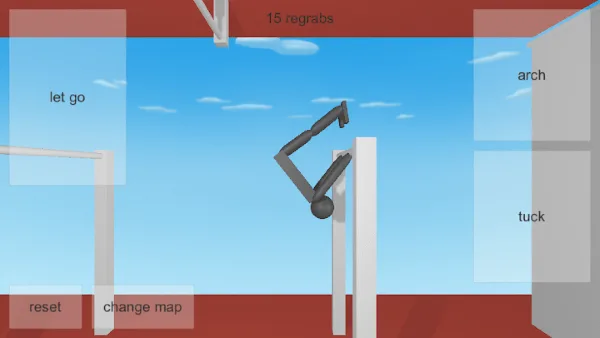
Rotation comes from two inputs
In the classic browser build, rotation is produced by the same two body inputs you already use while hanging: Space to tuck and Left Arrow to arch. Up Arrow lets go, and R resets. That is the complete list the developer documents — four inputs, no rotation key, no trick-select button.
Because of that, a flip is not a command you give. It is the result of when you tuck or arch, where you are in the swing when you do it, and what shape the body is in when you arrive. The same key press produces a different result at a different point in the swing. That is the whole difficulty.
So the goal of this page is not to name tricks. It is to make your rotation readable — so that when you add a flip to a move you already catch, you can still see the path back to the bar.
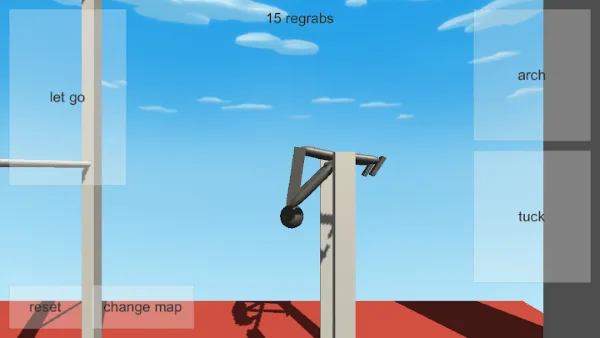
Separate swing, release and body position
Almost every confusing flip problem is three problems touching each other at once. Pull them apart before trying to fix anything:
- Swing — the pendulum motion you are already hanging in. It sets what you have available.
- Release — the moment you stop being on the bar. It sets the starting point and direction of everything that follows.
- Body position — tuck or arch, held at some point in the flight. It shapes how the rotation reads and where you end up.
Practise them separately first. Build a swing you can repeat, release as normal and do nothing in the air — that is your baseline. Then release as normal and change only the body position. Then, once that difference is visible, try moving the release instead.
If the swing is not repeatable yet, start with the swing timing drill. Every flip skill sits on top of that repetition.
Tucked and extended, compared
The two body shapes do different jobs, and comparing them directly is more useful than describing them.
Hold Space for a tucked body. The gymnast becomes compact, and a compact body is quick to change direction — which is why tucking while swinging makes a tighter, faster-looking turn. Hold Left Arrow for an arch, an open shape that keeps whatever direction it already had and tends to travel further before settling.
The comparison to run, three attempts per shape:
- Release as normal, then tuck immediately. Watch how the body points when it comes back around.
- Reset, release as normal, then arch immediately. Watch how far it travels before it settles.
- Reset, and do neither. Watch what the baseline path looks like.
After three of each you will have a personal rule — for most players something like "tuck keeps me compact, arch keeps me travelling" — and that rule is worth more to you than any description, because you built it from your own attempts.
Reading your own rotation
Rotation is hard to judge from inside the attempt. Four things make it visible:
- Where the head is pointing relative to the direction of travel.
- Whether the body is compact or open at the moment you notice it.
- Whether you can still see the next bar during the turn. If you cannot, the rotation is carrying you somewhere you have not chosen.
- What the body is doing as you arrive — still turning, or settled. This decides whether a catch is possible at all.
The third item is the practical test. If the bar is out of sight mid-rotation, that is not a technique failure so much as a sign that the rotation has taken the path somewhere you did not aim.
What each input does at each point
| Where you are | What to try |
|---|---|
| Hanging, before any release | Use arch and tuck to shape the swing itself. Keep it consistent — this is the part everything else is built on. |
| At the top of the swing | A shape change here affects the shape you release from, and therefore the whole flight. |
| Just after releasing | The first body change in the air sets the direction the rotation reads from. |
| Mid-flight | Compare a tuck against an arch here and watch how the arrival changes. |
| Just before the bar | Settle the body rather than starting something new. Arriving settled is what makes a catch. |
Use the right column as an observation list, not a script. Holding a shape you cannot maintain is worse than not changing it at all.
Diagnosing a flip that goes wrong
| What you see | What to try |
|---|---|
| No rotation at all | Hold the body change instead of tapping it. Compare against an attempt with no change at all. |
| Far too much rotation | Same release, but open the shape with arch. Compare the arrival. |
| Rotation is fine, catch is impossible | The body is still turning on arrival. Start settling the shape earlier. |
| Different result every attempt | The swing is not repeatable. Fix that before touching rotation. |
| Rotates one way, then the other | You are changing the release moment as well as the shape. Hold the release steady. |
| Rotation works on one side only | Practise the weaker side alone, without a release to think about. |
Two variables per attempt maximum, and preferably one. The table is ordered so the earliest causes come first — start at the top row that matches.
Adding rotation to a catch you already make
Never learn a flip and a new catch at the same time. The order that works:
- Catch the bar with no rotation. Do this three times in a row before adding anything.
- Add a small amount of rotation and still aim for the same bar. Misses are fine here — you are learning to carry rotation and still end up somewhere chosen.
- Settle the shape earlier in the flight so you arrive less turned.
- Only then try to catch again with the rotation in place.
Most “my flips land but I never catch anything” cases are step three skipped. Settling before arrival is what converts a rotation into a catch, and it costs nothing to practise on its own.
For the wider view of what happens once rotation is reliable, see release timing and how to regrab.
Twists and layouts are a separate feature
Twists and set layouts are described in the Google Play and App Store listings for the mobile NoomiClone build, alongside the 12 bar maps, 6 tumbling maps and replay video export. They are not part of the classic browser build, whose documented input list is the four keys above with no twist input.
If you play on mobile and want to work on named shapes, twists and layouts covers that build’s version of the problem. Check which build you have before following advice that mentions twists, maps or replays.
A flip drill that survives a bad attempt
Ten minutes, three blocks, and it works even when every attempt is poor:
- Block one, three minutes. Hang and swing. Shape only. No release at all. This is where the repetition comes from.
- Block two, four minutes. Release, then hold one shape in the air. Do not aim at anything. Just watch what the shape does.
- Block three, three minutes. Release and add the shape back on the same swing, aiming for the bar. Reset with R after every miss and do not chain more than three.
A bad session still produces information in blocks one and two. That is why this drill is worth running when you are frustrated — the swing work counts even when the catch work does not.
When to stop adding rotation
Stop when a flip is consistent and you still catch the same bar. Adding more on top of that is where progress usually stops being visible.
Signs that you have added too much at once:
- You cannot describe your flight path out loud without guessing.
- You miss more often than you did before adding the rotation.
- You are holding a shape longer to compensate, which changes the swing underneath the whole attempt.
When any of those appear, drop back one step and repeat the catch first. Once a line is going consistently, combos is the next thing to look at — building length, not adding difficulty.
Where this comes from
The four browser inputs come from the developer’s browser listing. Mobile features are described in the Google Play and App Store listings. The drills on this page are independent editorial practice suggestions, not documented game mechanics. More is in all NoomiClone guides, and common mistakes covers the errors that cause the most lost sessions.
Frequently asked questions
How do you do flips in NoomiClone?
Rotation in the browser build comes from two inputs: tucking with Space to tighten the body and spin faster, and arching with Left Arrow to extend it. The method is to separate swing, release and body position first, so that you can read your own rotation before you add it to a catch.
Why does my NoomiClone flip go wrong every time?
Because three different things are changing at once. The guide has a rotation diagnosis section that separates the swing from the release from the body position, and a drill that survives a bad attempt so you keep a working baseline.
Can I do twists in the NoomiClone browser version?
No. Twists and layouts are a separate feature that the store listings describe for the mobile editions, and the classic browser build documents none of them. The guide covers the mobile move set separately so the two are not confused.
When should I stop adding rotation in NoomiClone?
When the rotation starts costing you the catch. If you can already make the catch and adding rotation makes you miss it, the rotation is the wrong thing to be working on. The guide says to add rotation to a catch you already make, not the other way round.
Sources and scope. Browser key bindings and mobile feature descriptions were checked against the developer's browser listing, Google Play and App Store on October 19, 2026. Practice drills are independent editorial suggestions. Game screenshot provenance is documented in About & sources.