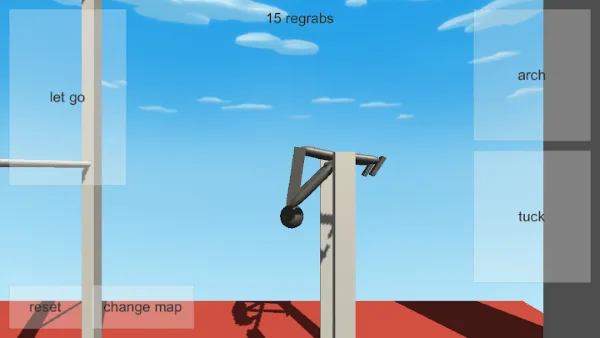
Twists and layouts are named among the moves in the official Google Play and App Store listings for NoomiClone. They are not named anywhere in the developer's browser listing. That single sentence is the most important fact on this page, and everything below is either an honest consequence of it or a practice method you can apply regardless.
You will also see the word move used loosely in this guide library, sometimes for a full skill and sometimes for one input. Here, a move family means a group of attempts that share a rotation pattern, so you can compare attempts against each other instead of against a fantasy.
What the listings say, and what they leave out
The store text says twists and layouts are part of the move set available on mobile. It does not publish a list of named moves, a rotation count for any of them, an input sequence, or a difficulty tag. Nobody has documented those details, so this guide will not pretend otherwise.
What that means practically is that you cannot look up a twist and follow a written recipe. What you can do is follow a method: establish a baseline attempt, change exactly one thing, and compare the outcome. The rest of this page is that method, applied to two families of rotation.
The four named inputs still do the work
The mobile screenshots label the same four actions the browser build documents on the keyboard: arch, tuck, let go and reset. The touch zones add a fifth label for changing map, which has nothing to do with rotation.
That is a useful anchor. Whatever a twist or a layout is on your device, the vocabulary you have to express it is four actions, not twenty buttons. When someone describes a move to you as a sequence, translate it back into arch, tuck, let go and reset, and ask which one changed. That single question removes most of the confusion in a group conversation.
Our controls guide covers the four inputs on keyboard, and the input timing guide covers why the same press feels different on a touchscreen. Both apply here, because a touch press has its own dead zone and its own travel.
This is the one place where a touch build genuinely behaves differently from the keyboard build, and it is worth a sentence of its own. A key press has a fixed, repeatable moment. A finger has a small region where the press is accepted, so the same intent can land a few milliseconds early or late depending on where the thumb sits. That variability is a fact about your hands and your screen, not about the game, and it is why a technique that felt crisp on a keyboard can feel vague on a phone.
Counter it the ordinary way: fewer inputs, bigger inputs, more attention. Cut the release down to a single deliberate tap instead of a flick that might or might not register, and treat any attempt where you were unsure whether the touch landed as a reset rather than as data.
What a twist asks of you
In general gymnastics terminology, a twist is rotation about the long axis of the body, the turn you see in a pirouette or in the rotation of a layout. A flip in the same vocabulary is rotation about a different axis. That distinction is worth holding because it explains the most common beginner mistake: using flip timing and expecting twist results.
Twists punish an approach that is already at its limit. If you release from a swing you can only just reach the next bar with, there is no room left for rotation before the catch. The move before the twist matters more than the twist, which is why the swing timing drill comes first and always will.
A workable order is: reach the bar reliably, hold it cleanly, add rotation, then worry about where you land. Skipping the first two is how a twist session turns into forty resets.
What a layout asks of you
A layout, in general terms, is an extended-body rotation rather than a folded one. The practical difference in play is what your body does between the release and the catch: a folded shape travels differently from an extended one, and the catch arrives in a different posture.
That is why body shape is the variable to isolate. If your attempts with one shape keep arriving short and your attempts with another keep arriving high but wild, you have found a real difference and can build on it. If every attempt feels identical, you are probably changing two things at once and cannot tell which one mattered.
Read the release timing guide for the mechanics of the moment itself, and the common mistakes guide for the pattern of what goes wrong late in a rotation rather than early.
Practising a new move without breaking a working swing
The method below assumes nothing about undocumented behaviour. It is how you stay productive when you cannot read a move off a menu.
- Write down the baseline. Before changing anything, record three attempts from the same swing on the same map. Note the swing you used and the outcome each time.
- Change one variable. One body shape, one release moment, one swing. Not two. A move you cannot attribute is a move you cannot learn.
- Reset early, not late. Use the reset control between attempts. Chasing a bad run teaches you the bad run.
- Watch the counter. The N regrabs counter in the mobile build gives you an honest number across the session. A session that raises the counter is a session that worked.
- Export a clip. When an attempt finally looks right, save it. The replay guide covers where exports land on Android and iOS.
- Return to the baseline. After a block of new attempts, go back to your original swing once. If it broke, the variable you changed was load-bearing.
Move families at a glance
| Move family | What the store listings say | What the browser build documents | Where to read more |
|---|---|---|---|
| Flip | Part of the mobile move list; no input sequence published | Reachable with arch, tuck and let go | Flips |
| Twist | Named among the mobile moves; no rotation counts published | No twist input is documented | This page |
| Layout | Named among the mobile moves; no body-shape guide published | No layout input is documented | This page |
| Bar to bar line | Enabled by the bar maps listed on the stores | No map count stated; no map-change key | Regrabs and maps |
Why the browser build documents none of it
Because the developer's browser listing simply does not describe them. The listing documents four keys and stops there, so a twist tutorial that assumes a fifth control cannot be written honestly for that build.
That is a limitation, not a defect. It also means the browser build is a clean place to learn the parts everything else depends on: swing rhythm, release timing and the shape of a good catch. Learn those there, then take them to the app when you want the larger move list. The edition comparison spells out which page belongs to which build, and the guides index lists everything else.
Frequently asked questions
What are twists and layouts in NoomiClone?
Move families described in the official store listings for the mobile editions. A twist asks you to rotate in the air, and a layout asks you to hold a different body shape, and the guide explains what each one demands of you.
Why does the NoomiClone browser build not document twists?
Because the browser build genuinely does not document them. Its four named inputs are still Left Arrow to arch, Space to tuck, Up Arrow to let go and R to reset. The guide separates what the store listings say from what the browser build supports so you do not follow the wrong tutorial.
How do you practise a new NoomiClone move without breaking a working swing?
Practise it on its own first and add it to a swing you already make. The guide has a safe practice sequence so a new move does not cost you the baseline you have spent time building.
Sources and scope. Browser key bindings and mobile feature descriptions were checked against the developer's browser listing, Google Play and App Store on October 19, 2026. Practice drills are independent editorial suggestions. Game screenshot provenance is documented in About & sources.