What counts as a combo
A combo is a run of catches with no reset between them. One catch is not a combo. Two is barely one. What makes a line interesting is that it survives — the swing you carry out of one catch becomes the swing you release from for the next.
That is the whole idea, and it is why combos feel different from isolated tricks. A single catch is a question: can I reach this bar? A line is a chain of questions where each answer sets up the next. Miss one and the whole thing ends, which is why building a line is mostly about not wasting what you have.
This page covers how to extend, when to reset, and how to keep a line readable. The advice is written to work on both builds — where behaviour differs, the difference is stated.
Extend or reset
The decision at every catch is the same: take the swing you have and aim at another bar, or reset and start clean.
Extend when the catch left you with visible swing — height at the top, a shape you recognise, and enough travel to reach another bar comfortably.
Reset when the catch was survived rather than landed: you arrived already spent, the swing barely builds, or you cannot name what the shape looks like at the top. Resetting with R on the browser build, or the reset zone on mobile, costs one attempt. Chasing a dead swing costs five.
A useful test: after the catch, does the gymnast rise again on the next swing? If it barely rises, you have nothing to work with and the reset is the better decision.
Keep the line readable
A chaotic line looks impressive in a replay and teaches you nothing. A readable line is one where you can say, after every catch, what you are aiming at and roughly how you will get there.
Three habits keep lines readable:
- One change at a time. Vary the release across attempts, not within a line. A line should use one approach repeated, not five approaches stacked.
- Same shape between bars. Keeping the body position consistent along the line means each catch sets up the next one instead of resetting it.
- Know where the line ends. Decide in advance how many catches you are attempting. Lines that are open-ended tend to end in a scramble.
Diagnosing a line that keeps breaking
| What you see | What to try |
|---|---|
| Always breaks at the same bar | Isolate that catch. Practise it on its own ten times before rebuilding the line. |
| Breaks earlier every attempt | You are spending more on each catch than you gain. Reset and use a more open shape. |
| Two catches work, three never does | The second catch leaves too little. Compare a release that costs you less. |
| Each catch looks different | Use one approach for the whole line. Variety inside a line is what makes it unreadable. |
| Catches fine, cannot aim anywhere specific | You are choosing a bar rather than a direction. Pick the target before the release, not after. |
| Misses happen at random, with no pattern | Check whether the input is arriving reliably — see input timing. |
Find the first row that matches and change only what it says, for a whole session. A line is built one repeatable catch at a time.
The same release, different bars
Once a single catch is reliable, the fastest way to extend a line is not to invent anything new — it is to reuse one release across several bars.
- Pick a release you catch reliably from a repeatable swing.
- Find the next bar along that your current path would reach anyway.
- Catch it with the same inputs you already use.
- Repeat, checking after each catch whether there is swing left.
The point is that a good release is reusable. If you can only make one release work on one bar, extend by resetting and rebuilding rather than by stacking more technique. Release timing is the page to read next if a single release is not yet reliable, and regrabs covers the catch itself in more detail.
Counting and reviewing a line
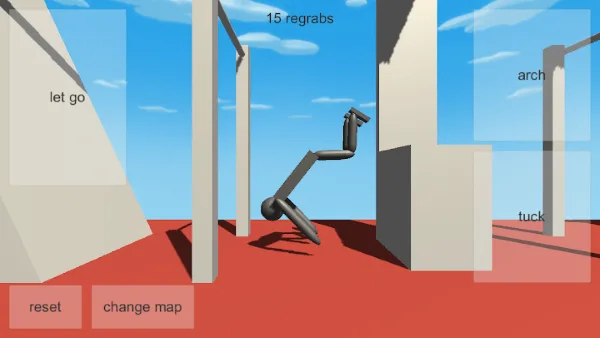
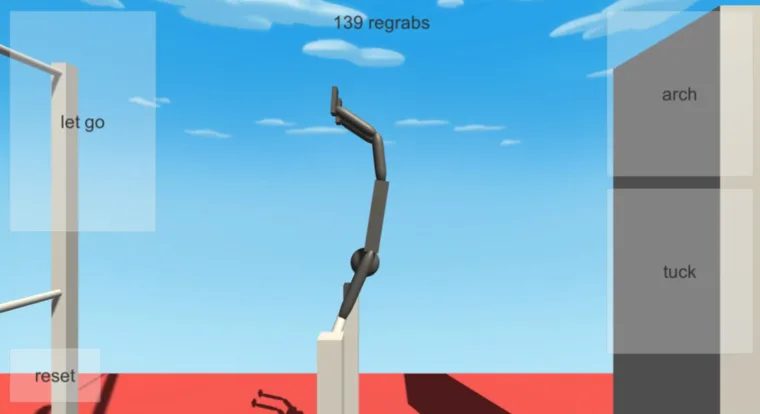
The Google Play and App Store listings describe an on-screen counter showing the number of regrabs on the mobile build, alongside labelled touch zones for let go, arch, tuck, reset and change map. That counter is the honest measure of a line — it removes the memory problem where a good run feels longer than it was.
Use it like this: pick one map, one starting approach, and one variable to test. Run the line a few times, note the count, change the variable, run again. A rise of one or two counts is a real result.
Those are store-listing features. The classic browser build does not show a regrab counter and does not document a map-change input, so on the browser side, write your counts down instead. A pencil and a line of paper does the same job.
Maps decide what a line can be
The store listings describe 12 bar maps and 6 tumbling maps in the mobile NoomiClone build, and a change-map zone to move between them. Different maps change the spacing between bars, and spacing is what decides whether a line is a series of short, safe catches or a series of long, expensive ones.
The practical consequence is that you cannot compare runs across maps. A count of four on a tight map and a count of four on a spread map are different achievements. Note the map with the count.
None of this applies to the classic browser build, which documents no map-change input at all. On that build the map is whatever the build gives you. The maps guide covers what is documented about each build, and which build you have helps if you are unsure.
Building a line on either build
The method is identical on both, and it is worth being explicit because the advice you find online often mixes them.
- Browser: Left Arrow arch, Space tuck, Up Arrow let go, R reset. Four documented inputs, no grab key, no twist key, no map-change key.
- Mobile: labelled touch zones for let go, arch, tuck, reset and change map, plus a regrab counter and additional content described in the store listings — 12 bar maps, 6 tumbling maps, twists and layouts, replay video export, optional account backup under Settings, NoomiCoins and skins.
Everything in this page — extend or reset, one change at a time, keep the line readable — applies to both. The counter and the map switching are the only conveniences that are mobile-only.
A plan for your next line
Write this down before you start a session. It takes two minutes and it is the difference between practising and hoping.
- Choose the line. A specific number of catches — four is a good first target.
- Choose the approach. One release, one shape, held constant.
- Choose the variable. One thing you will change, and only after the first three attempts.
- Set the stop. If the line breaks three times in the way you already know how to fix, stop and work on that instead.
- Record the result. Count on mobile, or write it down in the browser build.
Repeat the same plan next session with a different variable. Progress in this game shows up as a plan that produces one more catch than last week, not as a single spectacular run.
Reviewing what happened
Afterwards, one line of notes is enough: how many catches, where it broke, and what the break looked like. That line is your next session’s first task.
If you play on mobile, the store listings describe replay video export, which is the easiest way to review a line properly — replays and video export covers how that works. If a break was a landing rather than a catch, recovering after a fall is the next read. For a broken setup rather than a broken line, go back to the swing timing drill.
Sources and scope
The four browser inputs come from the developer’s browser listing. Mobile features — touch zones, the regrab counter, maps, twists and layouts, replay export, backup, NoomiCoins and skins — are described in the Google Play and App Store listings. Line-building methods here are independent editorial practice suggestions, not documented mechanics. Browse all NoomiClone guides for the rest.
Frequently asked questions
What counts as a combo in NoomiClone?
A combo is a line, not a single trick: a sequence of swings, releases and catches that you extend rather than reset between. The guide treats one clean catch as the starting unit, and a line as something you keep readable instead of chaotic.
How do you build a NoomiClone combo?
Extend or reset, deliberately. When a line keeps breaking, the guide has a diagnosis for it, and the advice is to keep the line readable: fewer changes, a release you have already made, and a map that supports the bar spacing you need.
Do NoomiClone maps decide what combos are possible?
Yes. Map layout decides which lines exist, because a combo is a route between bars and the spacing between them changes what you can reach. The guide covers how to pick a map for learning and how the same release can reach different bars on different maps.
How do you review a NoomiClone combo after it fails?
Record what happened rather than how it looked. The guide covers counting a line, reviewing it, and building a plan for the next one, and notes that the mobile build has replay recording while the browser build does not.
Sources and scope. Browser key bindings and mobile feature descriptions were checked against the developer's browser listing, Google Play and App Store on October 19, 2026. Practice drills are independent editorial suggestions. Game screenshot provenance is documented in About & sources.